Rust 07. Modules, Smart Pointers, Concurrency, and Async
Once you become a little more comfortable with Rust, the focus starts shifting from individual syntax rules to larger design questions: how to organize code, how to share data safely, and how to run multiple tasks at the same time. That is where module, smart pointers, concurrency, and async start becoming important.
This post explains those four ideas at a beginner-friendly level. A module helps structure code, smart pointers give you finer control over ownership and access, concurrency helps you handle multiple tasks safely, and async is designed for situations where waiting is a big part of the job.
Create a Practice Project
Create a new Cargo project like this and run the examples in src/main.rs.
cargo new rust-modules-concurrency
cd rust-modules-concurrency
code .
After pasting an example into src/main.rs, run it with:
cargo run
Modules: Organizing Code by Meaning
In Rust, a module is a way to split code into logical units and access them through paths. In a tiny example, everything can live in one file, but as code grows, mod, pub, and path usage become much more important.
The simplest example looks like this.
mod greeting {
    pub fn say_hello() {
        println!("hello from module");
    }
}

fn main() {
    greeting::say_hello();
}
The key ideas here are:
mod greetingcreates a modulepubmakes an item accessible from outside the module
When you split a module into a file, the structure becomes clearer.
src/
  main.rs
  greeting.rs
src/greeting.rs can look like this.
pub fn say_hello() {
    println!("hello from greeting.rs");
}
Then src/main.rs connects to it like this.
mod greeting;

fn main() {
    greeting::say_hello();
}
As a project grows, modules stop feeling like a small syntax feature and start becoming a major part of readability and maintainability.
Smart Pointers: More Precise Value Management
Basic references and ownership rules already solve many problems in Rust, but more advanced situations often require smart pointers. A smart pointer is not just an address. It is a type that carries extra behavior and metadata around that value.
Box
Box<T> is the most basic smart pointer for storing a value on the heap.
fn main() {
    let number = Box::new(100);
    println!("number = {}", number);
}
This looks simple, but the important detail is that the value lives on the heap instead of directly on the stack. Box<T> often appears with recursive types or large values.
Rc
Rc<T> allows shared ownership of a value in a single-threaded context.
use std::rc::Rc;

fn main() {
    let name = Rc::new(String::from("rust"));

    let a = Rc::clone(&name);
    let b = Rc::clone(&name);

    println!("a = {}", a);
    println!("b = {}", b);
    println!("count = {}", Rc::strong_count(&name));
}
The name clone() can make this look like a deep data copy, but Rc::clone does not duplicate the actual string contents. It only increases the reference count and creates another shared owner.
RefCell
RefCell<T> is used for the interior mutability pattern, where you want to change a value even when the outer binding itself is not declared as mutable.
use std::cell::RefCell;

fn main() {
    let value = RefCell::new(10);

    *value.borrow_mut() += 5;

    println!("value = {}", value.borrow());
}
Normally, many borrow rules are checked at compile time. RefCell<T> shifts some of those checks to runtime. That makes it more flexible, but misuse can cause a panic while the program runs.
Concurrency: Handling Multiple Tasks at Once
Rust’s concurrency model is especially strong because of its safety guarantees. Even when you create threads, Rust tries hard to stop unsafe sharing and data races before they happen.
The most basic example is creating a thread.
use std::thread;
use std::time::Duration;

fn main() {
    let handle = thread::spawn(|| {
        for i in 1..=3 {
            println!("spawned thread = {}", i);
            thread::sleep(Duration::from_millis(100));
        }
    });

    for i in 1..=2 {
        println!("main thread = {}", i);
        thread::sleep(Duration::from_millis(100));
    }

    handle.join().unwrap();
}
The output looks like this.
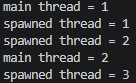
thread::spawn creates a new thread, and join() waits for that thread to finish.
In Rust, it is also common to use message passing instead of directly sharing data between threads.
use std::sync::mpsc;
use std::thread;

fn main() {
    let (tx, rx) = mpsc::channel();

    thread::spawn(move || {
        let message = String::from("hello from thread");
        tx.send(message).unwrap();
    });

    let received = rx.recv().unwrap();
    println!("received = {}", received);
}
With this pattern, one thread sends a value and another receives it safely.
When shared state is truly needed, Arc<Mutex<T>> is a very common combination.
use std::sync::{Arc, Mutex};
use std::thread;

fn main() {
    let counter = Arc::new(Mutex::new(0));
    let mut handles = vec![];

    for _ in 0..3 {
        let counter = Arc::clone(&counter);

        let handle = thread::spawn(move || {
            let mut number = counter.lock().unwrap();
            *number += 1;
        });

        handles.push(handle);
    }

    for handle in handles {
        handle.join().unwrap();
    }

    println!("counter = {}", *counter.lock().unwrap());
}
Here, Arc<T> provides shared ownership across multiple threads, and Mutex<T> ensures only one thread can access the protected value at a time.
Async: Doing Useful Work While Waiting
If concurrency is the broad idea of handling multiple tasks, async is especially powerful for tasks that spend a lot of time waiting, such as network requests or file I/O. The key ideas are async and await.
Async examples usually require a runtime. One of the most common beginner-friendly setups uses Tokio. In a fresh Cargo project, you need to add Tokio to Cargo.toml before the examples below will compile.
[dependencies]
tokio = { version = "1", features = ["macros", "rt-multi-thread", "time"] }
async fn get_message() -> String {
    String::from("hello async")
}

#[tokio::main]
async fn main() {
    let message = get_message().await;
    println!("message = {}", message);
}
You can read this flow like this:
async fncreates a future rather than producing the final value immediately.awaitwaits for that future to finish and gives you the result#[tokio::main]sets up a runtime that can execute an asyncmain- the runtime schedules and drives async tasks forward
The main advantage of async is that the thread does not have to sit idle just because one task is waiting. That is why async is especially useful for servers, networking, and other I/O-heavy workloads.
A small example that waits for multiple async tasks can look like this.
use tokio::time::{sleep, Duration};

async fn task(name: &str, delay_ms: u64) -> String {
    sleep(Duration::from_millis(delay_ms)).await;
    format!("done: {}", name)
}

#[tokio::main]
async fn main() {
    let first = task("A", 200);
    let second = task("B", 100);

    let (a, b) = tokio::join!(first, second);
    println!("{}, {}", a, b);
}
Because each task now contains a real .await point, this example does a better job of showing that tokio::join! can drive multiple futures forward and wait until all of them complete.
At first, threads and async can feel like the same idea. A helpful distinction is that threads use operating system threads directly, while async uses futures and a runtime to schedule many waiting tasks efficiently.
Combined Example
For this topic set, it is often more useful to see how the ideas connect than to force every concept into one perfectly unified file. The example below combines modules, smart pointers, and concurrency.
use std::sync::{Arc, Mutex};
use std::thread;

mod logger {
    pub fn print_status(message: &str) {
        println!("status = {}", message);
    }
}

fn main() {
    let shared = Arc::new(Mutex::new(Box::new(0)));
    let mut handles = vec![];

    for _ in 0..3 {
        let shared = Arc::clone(&shared);

        let handle = thread::spawn(move || {
            let mut value = shared.lock().unwrap();
            **value += 1;
        });

        handles.push(handle);
    }

    for handle in handles {
        handle.join().unwrap();
    }

    logger::print_status("all threads finished");
    println!("final = {}", **shared.lock().unwrap());
}
This example includes:
mod loggerfor separation of responsibilityBox<i32>for heap allocationArc<Mutex<_>>for safe shared statethread::spawnandjoin()for concurrency
Async usually fits better as a separate example because it often depends on a runtime and a different execution model.
Summary
This post covered modules, smart pointers, concurrency, and async as one connected flow. Modules help structure code, smart pointers give you more flexible ownership patterns, concurrency helps you handle multiple threads or tasks safely, and async is designed for efficient waiting-heavy workloads.
At this point, Rust often starts feeling less like a syntax exercise and more like a design toolkit. A practical next step is to continue with crate structure, testing, deeper lifetime usage, trait objects, or macros, where these design ideas become even more useful.
댓글남기기