Rust 05. Structs, Enums, Pattern Matching, and Traits
After learning ownership, borrowing, and lifetimes, the next step is understanding how Rust models real data and shared behavior. In Rust, struct is used to group related fields together, enum is used to represent one of several possible cases, match and if let are used to safely branch on those values, and trait is used to define shared behavior across multiple types.
This post walks through struct, enum, pattern matching, and trait as one connected set of ideas so you can build a solid mental model of how Rust organizes data and behavior.
Create a Practice Project
Create a new Cargo project like this and run the examples in src/main.rs.
cargo new rust-structs-enums-traits
cd rust-structs-enums-traits
code .
After pasting an example into src/main.rs, run it with:
cargo run
Struct: Grouping Related Data
Use a struct when you want to group several related fields under one type name. For example, instead of storing user information in separate variables, you can represent it as one user type.
struct User {
    username: String,
    active: bool,
    sign_in_count: u64,
}

fn main() {
    let user1 = User {
        username: String::from("k4nul"),
        active: true,
        sign_in_count: 1,
    };

    println!("username = {}", user1.username);
    println!("active = {}", user1.active);
    println!("sign_in_count = {}", user1.sign_in_count);
}
The output looks like this.
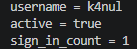
This is a named-field struct. Because each value has a field name, the meaning of each piece of data is easy to read.
When creating values, you also often see field init shorthand like this.
struct User {
    username: String,
    active: bool,
    sign_in_count: u64,
}

fn build_user(username: String) -> User {
    User {
        username,
        active: true,
        sign_in_count: 1,
    }
}

fn main() {
    let user = build_user(String::from("rustacean"));
    println!("{}", user.username);
}
The output looks like this.

Because the function parameter username has the same name as the struct field username, Rust lets you shorten username: username to just username.
Adding Methods with impl
To attach behavior to a struct, Rust uses an impl block.
struct Rectangle {
    width: u32,
    height: u32,
}

impl Rectangle {
    fn area(&self) -> u32 {
        self.width * self.height
    }

    fn can_hold(&self, other: &Rectangle) -> bool {
        self.width > other.width && self.height > other.height
    }
}

fn main() {
    let rect1 = Rectangle {
        width: 30,
        height: 20,
    };

    let rect2 = Rectangle {
        width: 10,
        height: 15,
    };

    println!("area = {}", rect1.area());
    println!("can_hold = {}", rect1.can_hold(&rect2));
}
The output looks like this.
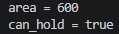
Here, &self means the method receives a reference to the current instance. A simple way to think about rect1.area() is that it behaves like Rectangle::area(&rect1).
You could write these as standalone functions, but when a behavior belongs closely to a type, putting it in an impl block is usually clearer.
Enum: Representing One of Several Cases
If a struct stores several fields at the same time, an enum stores exactly one variant out of several choices.
enum Message {
    Quit,
    Move { x: i32, y: i32 },
    Write(String),
    ChangeColor(u8, u8, u8),
}

fn main() {
    let message1 = Message::Quit;
    let message2 = Message::Move { x: 10, y: 20 };
    let message3 = Message::Write(String::from("hello"));

    match message1 {
        Message::Quit => println!("quit"),
        Message::Move { x, y } => println!("move to ({}, {})", x, y),
        Message::Write(text) => println!("text = {}", text),
        Message::ChangeColor(r, g, b) => println!("rgb({}, {}, {})", r, g, b),
    }

    match message2 {
        Message::Quit => println!("quit"),
        Message::Move { x, y } => println!("move to ({}, {})", x, y),
        Message::Write(text) => println!("text = {}", text),
        Message::ChangeColor(r, g, b) => println!("rgb({}, {}, {})", r, g, b),
    }

    match message3 {
        Message::Quit => println!("quit"),
        Message::Move { x, y } => println!("move to ({}, {})", x, y),
        Message::Write(text) => println!("text = {}", text),
        Message::ChangeColor(r, g, b) => println!("rgb({}, {}, {})", r, g, b),
    }
}
The output looks like this.
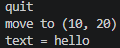
The important detail is that each variant can carry a different shape of data. Quit carries nothing, Move has named fields, Write stores a single String, and ChangeColor stores values like a tuple.
One of the most common enums in the Rust standard library is Option<T>.
fn main() {
    let some_number = Some(10);
    let no_number: Option<i32> = None;

    println!("some_number = {:?}", some_number);
    println!("no_number = {:?}", no_number);
}
The output looks like this.
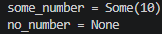
Option<T> safely represents the possibility that a value may be present or absent at the type level. Instead of leaving this vague like null in some languages, Rust prevents you from using it like an ordinary value until that possibility has been handled. In practice, you often do that with match, if let, helper methods, or ?.
Pattern Matching: match and if let
The most common way to read values out of an enum is with match. It is powerful because Rust requires you to handle every possible case.
enum Ticket {
    Normal,
    Vip(u32),
    Staff(String),
}

fn describe(ticket: Ticket) {
    match ticket {
        Ticket::Normal => println!("normal ticket"),
        Ticket::Vip(level) => println!("vip level = {}", level),
        Ticket::Staff(name) => println!("staff = {}", name),
    }
}

fn main() {
    describe(Ticket::Normal);
    describe(Ticket::Vip(3));
    describe(Ticket::Staff(String::from("admin")));
}
The output looks like this.
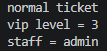
Inside match, you can immediately bind values stored inside a variant. That is the key idea in Ticket::Vip(level) and Ticket::Staff(name).
When you only care about one specific pattern and do not want to write every case, if let is often more convenient.
fn main() {
    let config_max = Some(5u8);

    if let Some(max) = config_max {
        println!("max = {}", max);
    } else {
        println!("no max value");
    }
}
The output looks like this.

You can think of if let as a compact version of match. Use match when you need full branching, and if let when you want to focus on one pattern quickly.
Trait: Defining Shared Behavior
A trait is a shared behavior contract that multiple types can implement. If you know Java interfaces, that is a useful first comparison, but they are not identical. Rust traits can provide default method implementations, and having a method with the same name does not automatically mean a type implements the trait.
trait Summary {
    fn summarize(&self) -> String;
}

struct BlogPost {
    title: String,
    author: String,
}

struct NewsArticle {
    headline: String,
    reporter: String,
}

impl Summary for BlogPost {
    fn summarize(&self) -> String {
        format!("{} - {}", self.title, self.author)
    }
}

impl Summary for NewsArticle {
    fn summarize(&self) -> String {
        format!("{} ({})", self.headline, self.reporter)
    }
}

fn notify(item: &impl Summary) {
    println!("summary = {}", item.summarize());
}

fn main() {
    let post = BlogPost {
        title: String::from("Rust Traits"),
        author: String::from("K4NUL"),
    };

    let article = NewsArticle {
        headline: String::from("Rust 1.xx Released"),
        reporter: String::from("Dev Reporter"),
    };

    notify(&post);
    notify(&article);
}
The output looks like this.

The important point is that BlogPost and NewsArticle have different structures, but both can provide the same Summary behavior. Because of that, notify does not need to know the concrete type. It only needs to know that the value implements Summary.
Combined Example
Here is one example that combines the ideas from this post.
trait Summary {
    fn summarize(&self) -> String;
}

#[derive(Clone, Copy)]
enum PostState {
    Draft,
    Published,
    Archived,
}

struct Article {
    title: String,
    state: PostState,
}

impl Article {
    fn new(title: &str, state: PostState) -> Self {
        Self {
            title: String::from(title),
            state,
        }
    }

    fn status_label(&self) -> &'static str {
        match self.state {
            PostState::Draft => "draft",
            PostState::Published => "published",
            PostState::Archived => "archived",
        }
    }
}

impl Summary for Article {
    fn summarize(&self) -> String {
        format!("{} [{}]", self.title, self.status_label())
    }
}

fn notify(item: &impl Summary) {
    println!("summary = {}", item.summarize());
}

fn main() {
    let post = Article::new("Rust Structs and Traits", PostState::Published);

    notify(&post);

    if let PostState::Published = post.state {
        println!("This post can be shown to readers.");
    }
}
This example includes a struct, an enum, match, if let, and a trait in one place. It is a good exercise to run the small examples separately first and then revisit this combined version.
Summary
This post covered struct, enum, pattern matching, and trait, which are some of the most important tools for modeling data in Rust. struct is great for grouping related fields, enum is powerful for representing one of several safe cases, match and if let let you read those cases clearly, and trait lets different types share common behavior.
A practical next step is to move on to topics such as Vec, HashMap, iterators, and error handling, where the struct, enum, and trait ideas from this post start connecting to more realistic application code.
댓글남기기